Documents Overview
Core concepts, supported formats, and the document lifecycle in DocQ.
Documents are the fundamental unit in DocQ. Every file you upload, generate from a template, or receive through an integration becomes a document that flows through your configured workflows.
Creating Documents
There are several ways to create documents in DocQ:
- File Upload -- Upload files directly from your computer through the Documents interface. See Uploading Documents for detailed instructions.
- Document Template -- Generate documents from pre-configured templates with variables that auto-populate. See Templates Overview for more.
- Form Filling -- Create documents by completing a form, which populates a linked template with the submitted data. See Forms for details.
Advanced Creation Methods
For organizations with high-volume or automated document intake, DocQ also supports:
- FTP Upload -- Automatically ingest documents from a designated FTP directory.
- Email Inbox Monitoring -- Monitor a configured email inbox and import attachments as new documents.
- Integrations -- Push documents into DocQ from external systems via the integrations framework. See Integrations Overview.
Supported Formats
DocQ supports the following file formats for upload and processing:
| Format | Extension | Notes |
|---|---|---|
.pdf | Full support for viewing, annotating, splitting, and merging | |
| Microsoft Word | .docx | Supports in-browser editing via the embedded text editor |
| Microsoft PowerPoint | .pptx | Upload and workflow processing; no in-browser editing |
| Image | .png | Upload and workflow processing |
Info
Only .docx files can be edited directly within DocQ. PDF files support annotations and highlights but not content editing. When a .docx document receives signatures or is merged, it is automatically converted to PDF.
Document Lifecycle
Every document in DocQ follows a lifecycle defined by its assigned workflow. The two primary statuses are:
- Active -- The document is currently progressing through its workflow. It can be edited, renamed, shared, split, merged, and have its workflow or metadata changed.
- Completed -- The document has finished all workflow steps. Completed documents cannot be edited, renamed, deleted, or have their workflow changed. They remain accessible for viewing and downloading.
Warning
Once a document reaches Completed status, most modification actions are permanently locked. Make sure all edits, metadata updates, and version changes are finalized before the document completes its workflow.
Filtering and Finding Documents
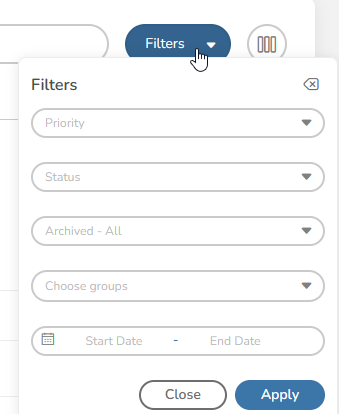
The Documents list provides filters to help you locate specific documents quickly. Use the filter controls at the top of the list to narrow results by status, workflow, group, date range, and other criteria.
List Settings
You can customize how the document list is displayed, including which columns are visible, the sort order, and the number of documents shown per page. These settings persist across sessions so your preferred view is always ready.
Next Steps
- Uploading Documents -- Learn how to upload single or bulk documents
- Editing Documents -- Edit content, metadata, and document properties
- Sharing Documents -- Share documents for review or e-signatures
- Reviewing Documents -- Approve, reject, annotate, and sign documents
- Versions & History -- Track versions and audit trails
- Office Editing -- Edit
.docxfiles in the embedded editor